
How do I manually open a cash drawer using an ACODE cash drawer trigger?

A cash drawer is typically opened via a POS system or a receipt printer. Once a transaction is completed, the POS software sends a command to the printer, which in turn triggers the cash drawer to open automatically. But what happens if the POS system, the printer, or the software malfunctions?
The answer is simple: use an ACODE cash drawer trigger.
An ACODE cash drawer trigger is a dedicated device that allows you to open a cash drawer manually—without the need for a POS terminal, receipt printer, or POS software. It sends an “open” signal directly to the cash drawer, providing a quick and reliable way to access cash whenever necessary.
How does it work?
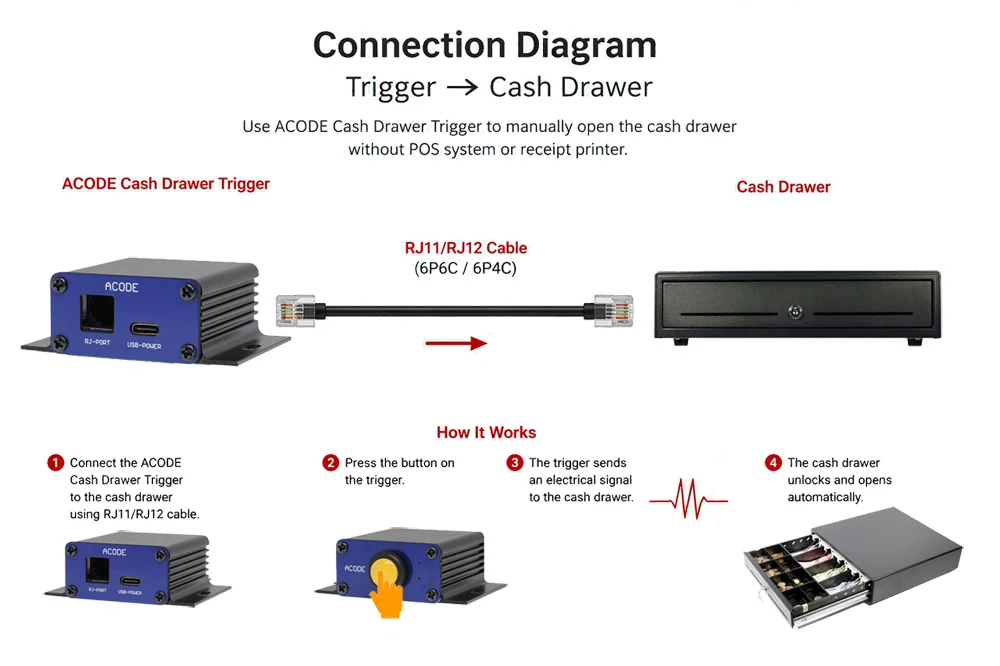
- Connect the ACODE cash drawer trigger to the cash drawer using an appropriate RJ11 or RJ12 cable.
- Depending on the model, the trigger can be activated by pressing a button, using a mobile app, or via Bluetooth, Wi-Fi, a USB connection, or a remote control function.
- The trigger immediately sends an electrical pulse to the cash drawer.
- The drawer unlocks and opens instantly.