
Open a Cash Drawer and discover flexible trigger options for every setup
Opening a cash drawer shouldn’t be complicated. Whether you’re running a busy retail store, a food truck, or a pop-up shop, Acode’s AT10 Series gives you five flexible ways to access your cash—without relying on a receipt printer. From simple push-button backups to wireless Bluetooth triggers, here’s how to choose the method that fits your business best.
How to Open a Cash Drawer: 5 Reliable Methods
Opening a cash drawer efficiently is essential for smooth retail and POS operations. Depending on your setup, there are several ways to trigger the drawer.
1. AT10PB Push-Button Manual Cash Drawer Opening
When the POS system crashes or power goes out, staff can still access the cash drawer quickly with a simple button press—no software or devices needed.
- Outdoor Market Stalls
Vendors at street markets often don’t have stable electricity or internet. The push-button trigger provides a reliable, low-tech way to open the drawer anytime.
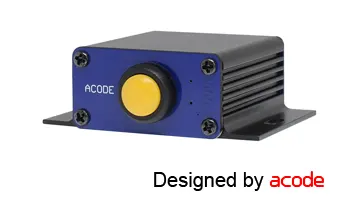
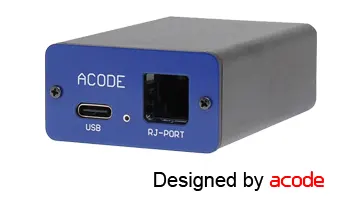
2. AT10U3 USB Cash Drawer Control Trigger
- Busy Retail Counters In supermarkets or convenience stores, staff often rely on desktop POS systems. The AT10U3 connects directly via USB, ensuring fast, reliable drawer opening without needing extra setup.
- Pharmacies & Clinics These environments value stability and compliance. A wired USB trigger avoids wireless interference and ensures the drawer opens consistently during transactions.
- Restaurants with Fixed POS Stations For dine-in restaurants where POS terminals are permanently installed, USB triggers are ideal. They provide a dependable connection and integrate smoothly with POS software.
- High-Security Environments Businesses that handle sensitive transactions (banks, ticketing offices) prefer USB because it reduces the risk of accidental disconnection compared to wireless triggers.
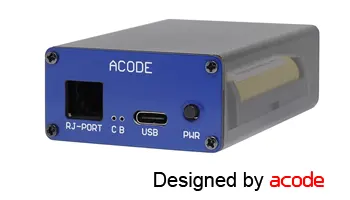
3. AT10B3 Bluetooth Cash Drawer Trigger
- Food Trucks & Pop-Up Stores Owners often prefer Bluetooth because they don’t want messy cables. The AT10B3 lets them pair the drawer directly with a tablet POS system, keeping the setup clean and mobile.
- Cafés with Limited Counter Space Small cafés benefit from wireless triggers since USB ports may already be occupied. Bluetooth avoids clutter and makes the drawer easy to reposition.
- Retail Stores Using iPads Many boutique shops run POS apps on iPads. The AT10B3 integrates smoothly without needing extra hardware, making it ideal for modern, minimalist setups.
4. AT10M3 Mobile/Battery Operated Battery Trigger
- Food Trucks & Street Vendors
Power outlets are scarce, but the AT10M3 lets vendors open their cash drawer anywhere, powered by a portable battery pack. - Outdoor Festivals & Events
At concerts, fairs, or night markets, POS setups often run on mobile devices. The AT10M3 ensures the drawer opens reliably without needing mains electricity. - Pop-Up Shops in Malls
Temporary retail booths can avoid complicated wiring. Staff simply connect the AT10M3 to a mobile battery and keep operations smooth. - Emergency Backup for Retail Stores
If the main POS system or power supply fails, the AT10M3 acts as a backup trigger, keeping transactions flowing.
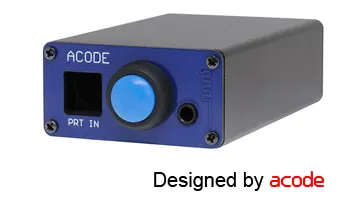
How AT10ME Works :
- Connection: Instead of plugging the cash drawer into the POS printer’s DK port, you connect the drawer to the AT10ME.
- Integration: The AT10ME then acts as a “bridge,” allowing multiple trigger methods (push button, Bluetooth, POS printer signal) to all open the same drawer.
- Flexibility: Staff can choose whichever method is most convenient—manual button, wireless Bluetooth, or automatic printer signal.
- Retail Stores with Mixed Systems Some staff use tablets with Bluetooth, while others rely on receipt printers. The AT10ME ensures both can open the same drawer without conflict.
- Restaurants with Backup Options If the POS printer fails, staff can still open the drawer via push button or Bluetooth, keeping service smooth during peak hours.
- Pop-Up Shops & Events Vendors can set up quickly, knowing that one drawer can be triggered by multiple devices depending on what’s available.
Make it easy for users to compare the four trigger options (Push-Button, USB, Bluetooth, Mobile Battery) at a glance:
| Trigger Type | Best For | Setup Complexity | Software Requirement | Portability |
|---|---|---|---|---|
| Push-Button (AT10PB) | Manual setups/emergencies | Very Low | No | Low |
| USB (AT10U3) | Desktop POS systems | Moderate | Yes | Medium |
| Bluetooth (AT10B3) | Wireless/mobile setups | Moderate | Yes | High |
| Battery Operated (AT10M3) | Mobile sales (food trucks) | Low | No | Very High |