
Comparing ALD-MP3 and ALD-MP4 Display Utilities
The ALD-MP3 and ALD-MP4 software utilities configure and manage customer-facing retail displays. While both tools control messaging and media, they support different hardware generations and content formats.
- ALD‑MP3 provides a stable foundation for essential text display, supporting HTML4 layouts and basic zone management. Designed for reliability, it ensures consistent performance in legacy POS environments.
- ALD‑MP4 elevates POS displays with HTML5 support, QR code integration, ESC/POS compatibility, and the exclusive Acode Command Set. Provides sharper visuals and richer content for future‑ready customer engagement.
1. Overview of ALD Customer Display Utilities
ALD Utilities provide configuration and control for multimedia LCD customer displays.
- ALD‑MP3 → stable legacy utility for basic text display.
- ALD‑MP4 → enhanced utility with HTML5, ESC/POS, proprietary Acode commands, and QR code support for modern POS environments.
2. Technical Comparison
| Category | ALD‑MP3 | ALD‑MP4 |
| HTML Support : | HTML | HTML5 |
| Command Set – VFD : | Epson, WD304, Logic Control | ESC/POS + Acode |
|---|---|---|
| Screen Zones : | Footer fixed (Enable only) | Footer flexible (Enable/Disable) |
| Color Handling : | Odd row only | Odd + Even row coloring |
| QR Code Support : | No | Yes (interactive QR codes) |
| Performance : | Stable, legacy drivers | Optimized drivers, lower CPU load |
| Updates : | Legacy maintenance | Active development, ongoing updates |
3. Sub‑categories inside table :
ALD Utilities provide configuration for LCD customer displays. MP3.x supports HTML4 and basic text zones, while MP4.x introduces HTML5, ESC/POS, proprietary Acode commands, and QR code integration for modern POS workflows.
| Category | Functions | VFD Customer Display | ALD‑MP3 | ALD‑MP4 |
| Header Logo : | Format | ✘ | JPG | JPG |
| System Clock : | Enable/Disable | ✘ | ✔ | ✔ |
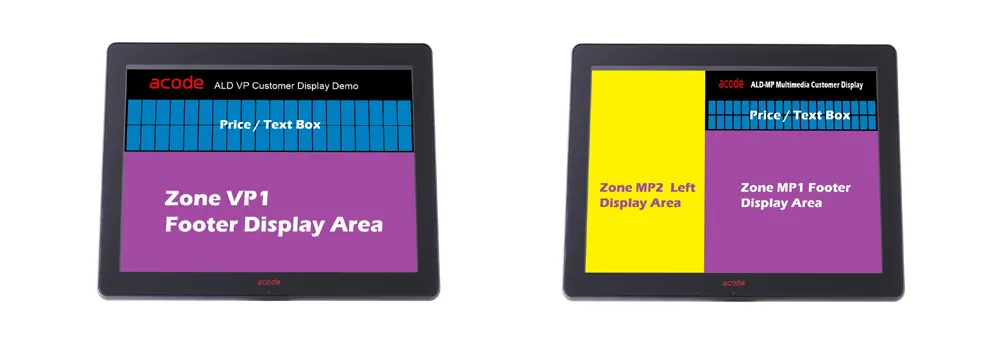
| Screen Zones : | Full Screen Zone (Promoter) | ✘ | Enable/Disable | Enable/Disable |
| Zone 1 – Footer Screen (VP1/MP1) | ✘ | Enable only | Enable/Disable | |
| Zone 2 – Left Screen (MP2) | ✘ | Enable/Disable | Enable/Disable | |
| Screen Size Ratio | ✘ | ✔ | ✔ | |
| Command Set : | ESC/POS,WD304,CD5220, Posiflex, Logic Controls | ESC/POS , Acode | ||
| Text Box : | Rows | 1-4 | 2–20 | 2–20 |
| Character | 2-20 | 2–30 | 2–30 | |
| Color Options : | Odd Row | ✘ | ✔ | ✔ |
| Even Row | ✘ | ✘ | ✔ | |
| Background | ✘ | ✔ | ✔ | |
| System Clock | ✘ | ✔ | ✔ | |
| Functions : | Font Selection | ✘ | ✔ | ✔ |
| Backup Path | ✘ | ✔ | ✔ | |
| Hide Cursor/Pointer | – | ✔ | ✔ | |
| Cursor | – | ✔ | ✔ | |
| Enable Setting Password | – | ✔ | ✔ | |
| Force Enable Backup Path | – | ✔ | ✔ | |
| Reset Customer Display String | ✘ | ✔ | ✔ | |
| Acode Command Set : | Proprietary Control | – | ✘ | ✔ |
4. Acode Command Set (MP4 Exclusive)
a. Playback Control
| Function | Syntax | Description |
| Active (Play) | <cmd>p,{zone},{duration},{file}</cmd> | Plays a file in the specified zone for a set duration. |
| Stop | <cmd>e,{zone}</cmd> | Stops playback in the specified zone. |
b. QR Code Integration
| Function | Syntax | Example |
| Generate QR Code | <cmd>qr,1,Description,URL</cmd> | Creates a QR code with label and link. |
| Example 1 | <cmd>qr,1,Driver Link,https://www.acode.com/en/driver-downloads/</cmd> | QR code linking to driver downloads. |
| Example 2 | <cmd>qr,1,ALD Product,https://www.acode.com/en/product-category/customer-display/</cmd> | QR code linking to product category page. |
c. Technical Notes :
- Zone Parameter → Defines display area (full screen, footer, left zone, etc.).
- Duration → Playback time in seconds; controls display cycles.
- File Parameter → Accepts supported multimedia formats (JPG, video, HTML5).
- QR Code → Encodes description + URL for direct customer interaction.
5. Why Upgrade to ALD-MP4?
Upgrading to ALD-MP4 unlocks modern display capabilities that go beyond the stable baseline of ALD-MP3.
- HTML5 Support → richer layouts, multimedia embedding, and compatibility with web‑based POS systems.
- Flexible Screen Zones → footer and left zones can be enabled/disabled, giving more control over layouts.
- Color Options → alternating odd/even row colors improve readability and customization.
- Exclusive Acode Command Set → adds multimedia playback and QR code integration for interactive customer engagement.
- Future‑Ready → optimized drivers, lower CPU usage, and ongoing updates ensure long‑term support.
6. Conclusion
- ALD-MP3 → Reliable, essential text display for legacy POS.
- ALD-MP4 → Advanced multimedia, QR codes, and exclusive Acode Command Set.
- Result → ALD-MP4 is the ideal upgrade for businesses seeking dynamic branding and customer engagement at the POS.